
Step Seven: Context specific link mappings
Read this page when you are using the Target Terminology OpenGALEN7. When you are using SNOMED CT, go to the next page.
A paraphrase of the rules we will declare for mapping HAS_FEATURE are:
If the descriptor on the right of the link is mapped to a kind of LeftRightSelector in OpenGALEN, then translate HAS_FEATURE to hasLeftRightSelector. If the descriptor maps to a kind of Urgency, use hasUrgency. If neither of these cases holds, then the mapping should fail.
The first three steps in the following instructions can be performed in any order:
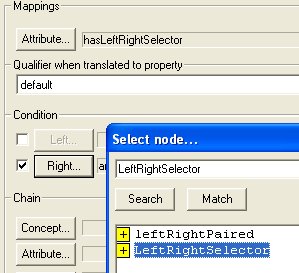
- Select HAS_FEATURE in the drop down list of links. In the Condition pane, check the box next to the Right button, and then press the Right button.
- Type leftright* into the search dialog text box, and press Search. A list of matching concepts from the Target Terminology appears. You can view the descendents of LeftRightSelector by clicking the
 symbol. Select LeftRightSelector and press OK.
- At the top of the Mappings pane, press the Attribute
button and type hasleft* into the text box in the new dialog. Press Search. In the list of concepts from the Target Terminology that appears, select hasLeftRightSelector and press the OK button to close the dialog.
- To confirm that this context specific mapping is the one you require, click the Add button at the bottom of the mapping panel.