
Step Eight: Rules
Read this page when you are using the Target Terminology OpenGALEN7. When you are using SNOMED CT, go to the next page.
In the OpenGALEN Target Terminology we want to transform our dissections to OpenGALEN concepts in such a way that they can be found below the concept SurgicalDeed, which is defined as:
Process
which playsClinicalRole SurgicalRole
However, we've mapped the descriptors in the category Deed to concepts in the OpenGALEN model, that appear somewhere in the hierarchy below the concept Process. These concepts are missing the criterion playsClinicalRole SurgicalRole. Somehow we have to add this criterion to these concepts during the transformation process. In other words we want to add an extra criterion to concepts that are a kind of Process in the Target Terminology OpenGALEN.
We're going to add a rule that says: All concepts of the kind Process in the Target Terminology, should be given the extra criterion playsClinicalRole SurgicalRole.
First specify for which concepts the rule applies: press the button Mapped to.., then search for and select the concept Process.
Now specify which criterion should be added: Press the button Attribute.. and select the attribute playsClinicalRole. Then, press the button Concept.. and select the concept SurgicalRole.
Make sure the checkbox before Wrapper is empty, and press the button Add to enter this rule.
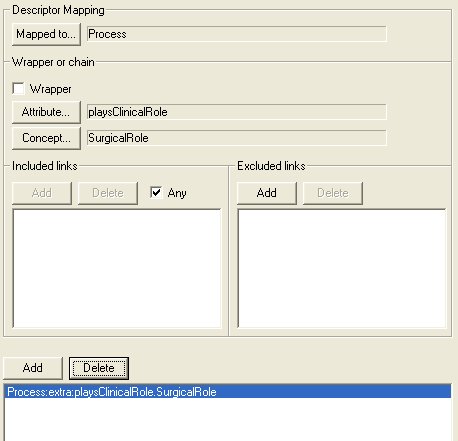
It is also possible to restrict this wrapping rule so that it only fires when the descriptor in question is preceded (or not) by specific Authoring Ontology links, using the Included Links and Excluded Links sections.