
Step Eleven: The Dissection Header
The new dissection dialog has two principle sections. The first section contains metadata about the dissection:
- A unique identifier (GUID) for the dissection, useful for tracking the dissection through e.g. an authoring workflow. This can be either specified or, if you click the GUID button, one is generated for you.

- If the dissection corresponds to an existing code and rubric in an external coding system, such as ICD, then the relevant Source, Code and Rubric are entered. These can be automatically pre-filled if the coding scheme is loaded into the Terminology Server.

- One of 10 manually assigned editorial or process status values for the dissection. Initially designated by the digits 0-9, these designations can be changed to something more meaningful by selecting Options/Change
on the application menu and then selecting the Status tab.
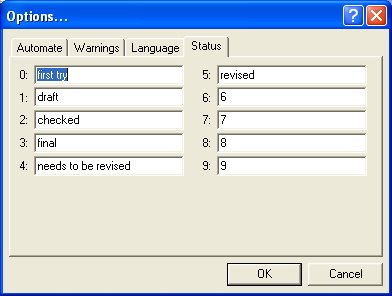
- If the entry in the Rubric field is considered to be ambiguous or a jargon phrase, then a less ambiguous and more widely understandable explanation may be provided as the Paraphrase. It is also possible to automatically generate a candidate paraphrase from the content and structure of the dissection itself, by pressing the Paraphrase button.

- If the Paraphrase is not in English, but dissections are to be authored within an international collaboration, an English translation of the paraphrase may be provided.
- General comments can be added as a Comment