
Step Twelve: Authoring a dissection
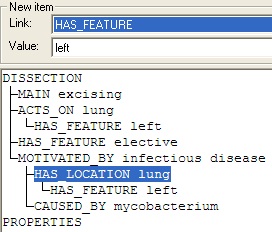
You may also choose to clarify that the location of the infectious disease was the same lung as the one being removed, ie that it was the left lung:
Select the line [HAS_LOCATION lung] in the dissection pane.
Select HAS_FEATURE from the drop down Link list.
Only the descriptor category Feature is offered.
Select left from the drop down Value list.
Click Add.
Your dissection should now look as shown below:
To save the completed dissection, click the Accept button at the bottom left of the dialog.