
Step Fifteen: Templates
When a dictionary contains templates, SPET allows a user to select a desired template for a new dissection. The template is then shown in the dissection editor and a user only has to replace the categories in the template with the appropriate descriptors.
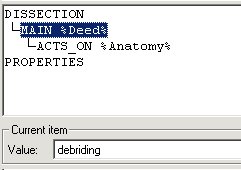
Start SPET and press Add to add a new dissection. A list with the defined templates appears. Select the template basic surgical procedure (by double-clicking or press Ok): the dissection dialogue should now look like this:
Enter Heart implantation in the Rubric field.
Select the line [MAIN %Deed%]. The descriptors in this category appear in the list Current item below the dissection. Select the desired descriptor, in this example implanting.
Select the line [ACTS_ON %Anatomy%], and select heart in the Current item list.
Press Paraphrase to generate a paraphrase directly from the dissection. The proposed paraphrase is implanting heart, press Replace to accept this paraphrase.
Press Accept to complete the dissection. The new dissection is added to the list of dissections, and a new dissection with the selected template may be specified.